

- Vaping Forum Yocan Concentrate Vape Support More Concentrate Vapes
-
- It is currently Mon Oct 26, 2026 12:53 pm
- All times are UTC-04:00
Ad blocker detected: Our website is made possible by displaying online advertisements to our visitors. Please consider supporting us by disabling your ad blocker on our website.
What Do the LED Colors on the Yocan FLAT Mean?
Discuss all Yocan Vaporizer pen device, includes but not limited yocan evolve plus Device Basics, Troubleshooting, Order Questions, Shipping Questions, Manufacturing & Quality and other Yocan vape pens.
Moderator: Michelle
-
Rhea

- Posts: 734
- Joined: Sun Mar 06, 2022 9:41 pm

What Do the LED Colors on the Yocan FLAT Mean?
The Yocan FLAT features three voltage settings, each indicated by a different LED color. These settings allow users to customize their vaping experience based on their cartridge and personal preference.
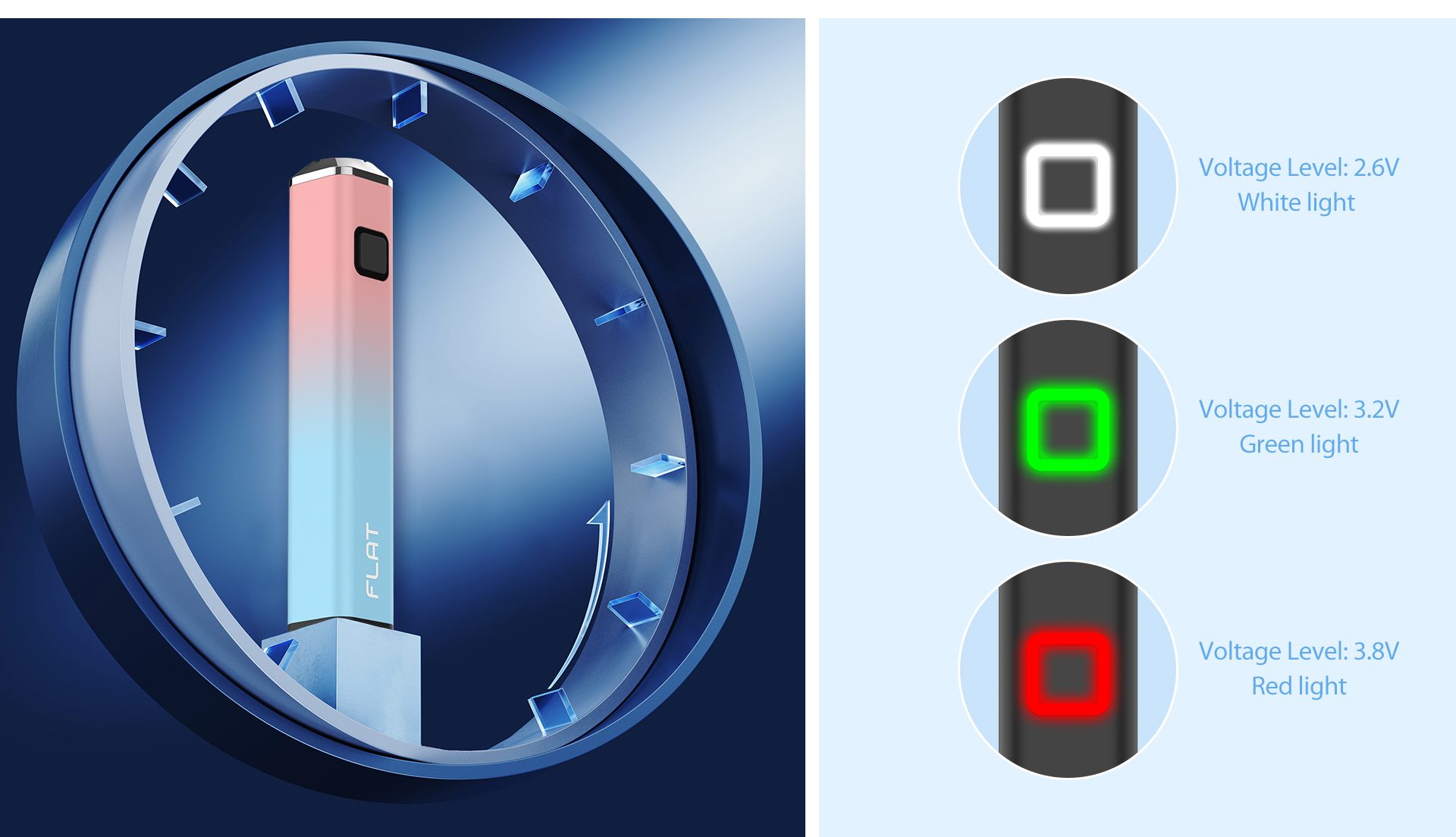
White Light – 2.6V
The lowest voltage setting provides a smooth and flavorful draw. It is ideal for preserving terpene profiles and enjoying the natural taste of your oil.
Green Light – 3.2V
The medium voltage setting offers a balanced experience between flavor and vapor production. This is the recommended setting for most 510-thread cartridges.
Red Light – 3.8V
The highest voltage setting produces thicker vapor and stronger hits. It is suitable for users who prefer more intense vapor production.
How to Change the Voltage
Press the power button three times quickly to cycle through the available voltage levels:
White Light = 2.6V
Green Light = 3.2V
Red Light = 3.8V
Choose the voltage that best matches your cartridge and vaping style for the best performance from your Yocan FLAT.
Need more help? Feel free to leave a comment below or contact the Yocan support team.
White Light – 2.6V
The lowest voltage setting provides a smooth and flavorful draw. It is ideal for preserving terpene profiles and enjoying the natural taste of your oil.
Green Light – 3.2V
The medium voltage setting offers a balanced experience between flavor and vapor production. This is the recommended setting for most 510-thread cartridges.
Red Light – 3.8V
The highest voltage setting produces thicker vapor and stronger hits. It is suitable for users who prefer more intense vapor production.
How to Change the Voltage
Press the power button three times quickly to cycle through the available voltage levels:
White Light = 2.6V
Green Light = 3.2V
Red Light = 3.8V
Choose the voltage that best matches your cartridge and vaping style for the best performance from your Yocan FLAT.
Need more help? Feel free to leave a comment below or contact the Yocan support team.
Return to “More Concentrate Vapes”
Jump to
- New Vapers, Start Here!
- ↳ Forum Rules
- ↳ New Members Forum
- ↳ Site Feedback
- ↳ Yocan.com Feedback
- ↳ YocanOnline.com Feedback
- ↳ Forum.yocantech.com Feedback
- Yocan Black Premium Vape subforum
- ↳ Yocan Black Pocket Mini
- ↳ Yocan Black Pocket Mini Official link
- ↳ Yocan Black Pocket Mini User Manual
- ↳ Yocan Black Pocket Mini retail page
- ↳ Yocan Black Pocket Series
- ↳ Yocan Black Pocket Mini Travel Case Kit
- ↳ Yocan Black Cloud 2.1 Chamber
- ↳ Yocan Black Pocket
- ↳ Yocan Black Pocket Series Collection Page
- ↳ Yocan Black Pocket User Manual
- ↳ Yocan Black Pocket Retail Page
- ↳ Yocan Black Pocket Travel Case Kit Retail Page
- ↳ Yocan Black
- Yocan Concentrate Vape Support
- ↳ Yocan Orbit 2.0
- ↳ Yocan Orbit 2.0 User Manual
- ↳ Yocan Orbit 2.0 Official Product Link
- ↳ Yocan Iris
- ↳ Yocan Iris Official Product Link
- ↳ Yocan Iris User Manual
- ↳ Yocan Nestor
- ↳ Yocan Nestor Official Link
- ↳ Yocan Nestor User Manual
- ↳ Yocan Nestor for Sale
- ↳ Yocan Orbit
- ↳ Yocan Orbit Official Link
- ↳ Yocan Orbit User Manual
- ↳ Buy Yocan Orbit Today
- ↳ More Concentrate Vapes
- ↳ Yocan Evolve Plus
- ↳ Yocan Evolve plus Official Link
- ↳ Buy Yocan Evolve Plus Today
- ↳ Yocan Evolve Plus User Manual
- ↳ Yocan Magneto
- ↳ Yocan Magneto Official Link
- ↳ Buy Yocan Magneto Today
- ↳ Yocan Evolve Plus XL
- ↳ Yocan Evolve Plus XL Official Link
- ↳ Buy Yocan Evolve Plus XL Today
- ↳ Yocan Evolve Plus XL User manual
- ↳ Yocan Loaded
- ↳ Yocan Loaded Official Link
- ↳ Buy Yocan Loaded Now
- ↳ Yocan Apex Mini
- ↳ Yocan Apex Mini Official page
- ↳ Yocan LIT
- ↳ Yocan LIT intro
- ↳ Yocan LIT User Manual
- ↳ Buy Yocan LIT
- ↳ Yocan Apex
- ↳ Yocan Apex official link
- ↳ Yocan Apex User Manual
- ↳ Buy Yocan Apex today!
- ↳ Yocan Armor Plus
- ↳ Yocan Armor Plus Product Link
- ↳ Yocan Armor Plus User Manual
- ↳ Yocan Falcon Mini
- ↳ Yocan Falcon Mini official link
- ↳ Yocan Falcon Mini User Manual
- ↳ Yocan Loki
- ↳ Yocan Loki Official Link
- ↳ Yocan Loki User Manual
- ↳ Buy Yocan Loki Today
- ↳ Yocan Rex
- ↳ Yocan Rex Official Link
- ↳ Buy Yocan Rex Today!
- ↳ Yocan Rex User Manual
- ↳ Yocan Armor
- ↳ Yocan Armor Official Link
- ↳ Buy Yocan Armor
- ↳ Yocan Armor User Manual
- ↳ Yocan Regen
- ↳ Yocan Regen Official Link
- ↳ Buy Yocan Regen Today!
- ↳ Yocan Regen User Manual
- ↳ Yocan X
- ↳ Yocan X Product page
- ↳ Yocan X User Manul
- ↳ Buy Yocan X Today!
- ↳ Yocan Pillar
- ↳ Yocan Pillar Product Link
- ↳ Yocan Pillar User Manual
- ↳ Yocan Cubex
- ↳ Yocan Cubex Official Link
- ↳ Yocan Cubex User Manual
- ↳ Yocan Zen
- ↳ Yocan Zen User Manual
- ↳ Yocan Zen Official Link
- ↳ Buy Yocan Zen Today
- ↳ Yocan Blade
- ↳ Yocan Blade Ofiicial Link
- ↳ Yocan Blade User Manual
- ↳ Buy Yocan Blade Today
- ↳ Yocan Dyno
- ↳ Yocan Dyno Official Link
- ↳ Yocan Dyno User Manual
- ↳ Buy Yocan Dyno
- ↳ Yocan Cylo
- ↳ Yocan Cylo Official Link
- ↳ Yocan Cylo User Manual
- ↳ Buy Yocan Cylo
- ↳ Yocan Dirk
- ↳ Yocan Dirk Official Official Product Link
- ↳ Yocan Dirk User Manual
- ↳ Yocan Dirk Hot Knife for sale
- ↳ Yocan iCan
- ↳ Yocan iCan Official Link
- ↳ Yocan iCan User Manual
- ↳ Yocan iCan for sale
- Yocan CBD Vape Support
- ↳ Yocan UNI 4.0
- ↳ Yocan UNI 4.0 Official product link
- ↳ Yocan UNI 4.0 User Manual
- ↳ Yocan Hito Series
- ↳ Yocan Hito Series Official product link
- ↳ Yocan Hito Series user manual
- ↳ Yocan Ziva 2.0
- ↳ Yocan Ziva 2.0 official product link
- ↳ Yocan Ziva 2.0 User Manual
- ↳ Yocan Flat 2.0 Series
- ↳ Yocan Flat 2.0 Series Official Link
- ↳ Yocan Flat 2.0 User Manual
- ↳ Yocan Lux 2.0 Series
- ↳ Yocan Lux 2.0 Series official link
- ↳ Yocan Lux 2.0 Series User Manual
- ↳ Yocan Ari 2.0 Series
- ↳ Yocan Ari 2.0 Series official link
- ↳ Yocan User Manuals
- ↳ Yocan Kodo Pro
- ↳ Yocan Kodo Pro Official Link
- ↳ Yoan Kodo Pro User Manual
- ↳ Buy Yocan Kodo Pro
- ↳ Yocan UNI Pro
- ↳ Yocan UNI Pro Offcial Link
- ↳ Buy Yocan UNI Pro Today!
- ↳ Yocan UNI Pro User Manual
- ↳ CBD Vapes
- ↳ Yocan Kodo
- ↳ Yocan Kodo Official Link
- ↳ Buy Yocan Kodo
- ↳ Yocan WIT
- ↳ Yocan WIT Official Link
- ↳ Yocan Groote
- ↳ Yocan Groote Official Link
- ↳ Buy Yocan Groote
- ↳ Yocan Rega
- ↳ Yocan Rega Official Link
- ↳ Buy Yocan Rega
- ↳ Yocan Hive
- ↳ Yocan Hive Official Link
- ↳ Buy Yocan Hive Now
- ↳ Yocan Hive 2.0
- ↳ Yocan Hive 2.0 Official Link
- ↳ Buy Yocan Hive 2.0 Now
- ↳ Yocan KEEN
- ↳ Yocan KEEN Product Link
- ↳ Yocan Stix 2.0
- ↳ Yocan Stix 2.0 Product Link
- ↳ Yocan STIX
- ↳ Buy Yocan STIX Today
- ↳ Yocan STIX Official Link
- ↳ Yocan UNI S
- ↳ Yocan UNI S Official Link
- ↳ Yocan UNI S User Manual
- ↳ Buy Yocan UNI S Today!
- ↳ Yocan UNI Twist
- ↳ Yocan UNI Twist Official Link
- ↳ Yocan UNI Twist User Manual
- ↳ Buy Yocan UNI Twist Today
- ↳ Yocan Handy
- ↳ Yocan Handy Official Link
- ↳ Buy Yocan Handy Today
- ↳ Handy User Manual
- ↳ Yocan Stix Plus
- ↳ Yocan Stix Plus official link
- ↳ Yocan B-smart
- ↳ Yocan B-smart Official Link
- ↳ Yocan Flat Series
- ↳ Yocan Flat Series Official Link
- ↳ Yocan LUX
- ↳ Yocan LUX Official Site
- ↳ Yocan ARI Series
- ↳ Yocan ARI Product Link
- ↳ Yocan UNI
- ↳ Yocan UNI Official Link
- ↳ Buy Yocan UNI Now
- ↳ Youcan UNI Manual
- ↳ Yocan Verve
- ↳ Yocan Verve Official Link
- ↳ Yocan Verve User Manual
- ↳ Buy Yocan Verve Today
- ↳ Yocan Ziva
- ↳ Yocan Ziva Official Link
- ↳ Yocan Ziva User Manual
- ↳ Buy Yocan Ziva Today
- ↳ Yocan Kodo Plus
- ↳ Yocan Kodo Plus Official Link
- ↳ Yocan Kodo Plus User Manual
- ↳ Yocan Kodo Animal Series
- ↳ Yocan Kodo Animal Series Official Link
- ↳ Yocan Kodo Animal Series User Manual
- ↳ Yocan Ziva Pro
- ↳ Yocan Ziva Pro Official Link
- ↳ Yocan Ziva Pro User Manual
- ↳ Yocan Kodo Star
- ↳ Yocan Kodo Star Official Product Link
- ↳ Yocan Kodo Star User Manual
- ↳ Yocan UNI 3.0
- ↳ Yocan UNI 3.0 Official Link
- ↳ Yocan UNI 3.0 User Manual
- ↳ Yocan UNI 3.0 for sale
- Yocan Dry Herb Vape Support
- ↳ Yocan Vane 2
- ↳ Yocan Vane 2 Official Link
- ↳ Yocan Vane 2 User Manual
- ↳ Yocan Hit 2
- ↳ Yocan Hit 2 Official Link
- ↳ Yocan Hit 2 User Manual
- ↳ Yocan Draco
- ↳ Yocan Draco Official Product Link
- ↳ Yocan Draco User Manual
- ↳ Yocan Vane
- ↳ Yocan Vane Official Link
- ↳ Buy Yocan Vane
- ↳ Yocan Vane User Manual
- ↳ Yocan Hit
- ↳ Yocan Hit Official Link
- ↳ Get Yocan HIT Vaporizer
- ↳ Yocan HIT User Manual
- ↳ Yocan Weed Vape - General Discussion
- Yocan Multi-use Vape Support
- ↳ Yocan Falcon
- ↳ Yocan Falcon Official Link
- ↳ Yocan Falcon User Manual
- ↳ Yocan Evolve 2.0
- ↳ Yocan Evolve 2.0 Official Link
- ↳ Buy Yocan Evolve 2.0 Now
- ↳ Yocan DeLux
- ↳ Yocan DeLux Official Link
- ↳ Buy Yocan DeLux Today
- ↳ Yocan Trio
- ↳ Yocan Trio Official Link
- ↳ Buy Yocan Trio Today
- ↳ Yocan Trio User Manual
- Yocan General Vape Support
- ↳ Yocan Vaping Accessories Support
- Yocan Distributors Exclusive Vape Support
- ↳ Yocan Torch
- Yocan Sub-Brands
- ↳ Yocan Red
- ↳ Yocan Gold
- Vaping Discuss
- ↳ Vaporizer Daily Handcheck
- ↳ General Vaping Discussion
- ↳ Vape Pod Systems
- ↳ Box Mods Discussion
- ↳ General E-Liquid Discussion
- ↳ Vaping Accessories Discussion
- ↳ Ask Vaping Experts
- ↳ Vaporizer Contest & Giveaway
- ↳ Yocan Weekly Vaping Giveaways
- Vaping Reviews
- ↳ Written Reviews
- ↳ Video Reviews
- ↳ Pod Systems
- ↳ Box Mods
- ↳ Vaping Accessories
- Vaping Update & News
- ↳ Exhibition and Events
- ↳ Legislation News & Vape News
- ↳ Vape Associations
- ↳ Vaporizer Discount & Coupons