Yocan Lux 2.0 FAQ
Posted: Fri Jan 23, 2026 2:50 am
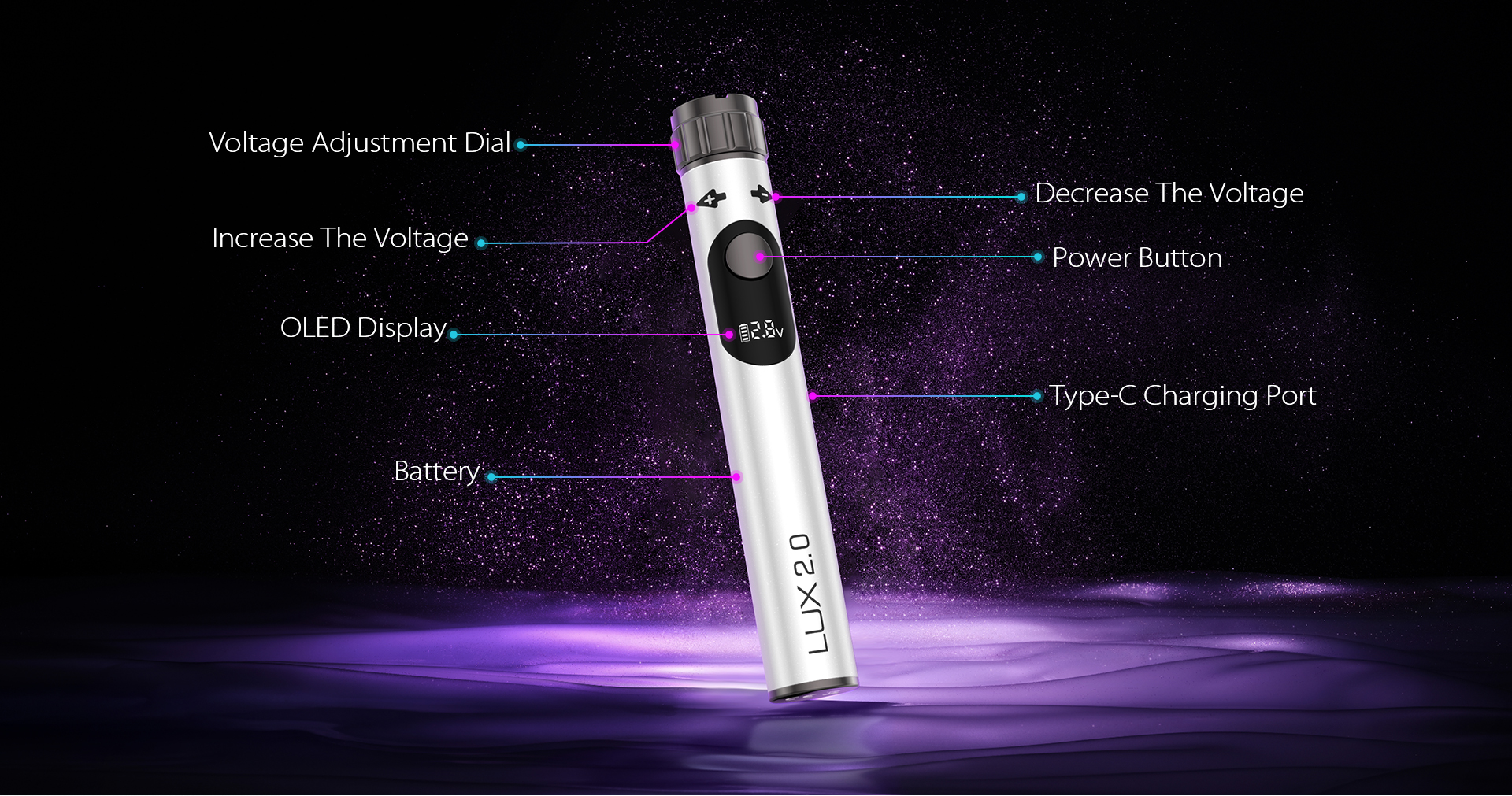
Hi everyone, this post will provide a detailed guide on how to properly use the Yocan Lux 2.0 series. The Yocan LUX 2.0 510 battery features a 400mAh capacity, a smooth top voltage adjustment knob, and an auto-shutdown function, ensuring a safe and reliable vaping experience. After 15 seconds of continuous use, the device will pause output; After 1 hour of inactivity, the device will fully power off to conserve battery life. Voltage can be adjusted via the top knob within a range of 1.8V to 4.2V. The built-in OLED display shows key information including current voltage, puff count, and remaining battery life. The puff counter automatically resets after 9,999 puffs. This battery is compatible with pods featuring a standard 510 thread connection.
How to Use Yocan Lux 2.0 Series
1. Cartridge Connection: Take the 510 cartridge and securely connect its interface to the corresponding port on the device, ensuring a tight fit with no wobble.
2. Power On/Off: To turn on the device, rapidly press the power button 5 times within 2 seconds. To turn off, rapidly press the power button 5 times within 2 seconds while the device is on.
3. Preheat Function: After powering on, rapidly press the power button twice to activate the 1.8V 10-second preheat mode for an enhanced experience.
4. Adjusting Voltage: A knob on the device's top allows voltage adjustment. Rotate left to increase voltage; rotate right to decrease voltage. Adjust as needed.
6. Vaping Operation: Press and hold the power button while gently inhaling through the mouthpiece air vent to enjoy vapor.
7. Reset counter: To reset the puff counter, press the power button three times while the device is powered on.
Charging notes: The device charges via a Type-C port and does not support fast charging. The battery indicator light will turn off once when fully charged. Note: The device will automatically power off after 1.0 hour of inactivity.
For more products, visit: Yocan
If you have any questions, please ask them in the comments section.
How to Use Yocan Lux 2.0 Series
1. Cartridge Connection: Take the 510 cartridge and securely connect its interface to the corresponding port on the device, ensuring a tight fit with no wobble.
2. Power On/Off: To turn on the device, rapidly press the power button 5 times within 2 seconds. To turn off, rapidly press the power button 5 times within 2 seconds while the device is on.
3. Preheat Function: After powering on, rapidly press the power button twice to activate the 1.8V 10-second preheat mode for an enhanced experience.
4. Adjusting Voltage: A knob on the device's top allows voltage adjustment. Rotate left to increase voltage; rotate right to decrease voltage. Adjust as needed.
6. Vaping Operation: Press and hold the power button while gently inhaling through the mouthpiece air vent to enjoy vapor.
7. Reset counter: To reset the puff counter, press the power button three times while the device is powered on.
Charging notes: The device charges via a Type-C port and does not support fast charging. The battery indicator light will turn off once when fully charged. Note: The device will automatically power off after 1.0 hour of inactivity.
For more products, visit: Yocan
If you have any questions, please ask them in the comments section.