

How to Clean Your Yocan Black Pocket Mini: A Simple Maintenance Guide
Moderator: Rhea
-
Rhea

- Posts: 734
- Joined: Sun Mar 06, 2022 9:41 pm

How to Clean Your Yocan Black Pocket Mini: A Simple Maintenance Guide
Keeping your Yocan Black Pocket Mini clean is essential for maintaining smooth airflow, consistent performance, and a better overall experience. With its upgraded Cloud 2.1 Ceramic Chamber and ceramic airflow mouthpiece, regular cleaning helps prevent buildup and keeps your device working properly.
Follow these simple steps to clean your Yocan Black Pocket Mini.
1. Turn Off the Device and Let It Cool
Before cleaning, make sure the device is powered off. Allow the chamber to cool down until it is warm to the touch but no longer producing heat.
2. Clean the Cloud 2.1 Ceramic Chamber
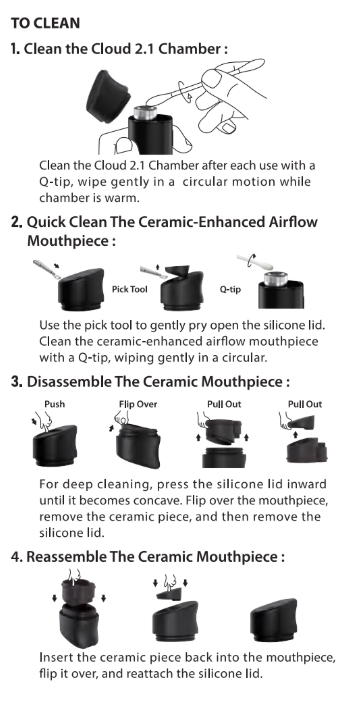
Remove the mouthpiece and gently wipe the ceramic chamber using an ISO cleaning stick.
Clean the chamber with gentle circular motions to remove any residue while avoiding excessive pressure on the ceramic surface.
3. Clean the Ceramic Airflow Mouthpiece
Use the included pick tool to carefully remove the silicone cover from the mouthpiece.
Clean the ceramic airflow component with an ISO cleaning stick, then allow it to dry completely before reassembly.
4. Disassemble the Ceramic Mouthpiece for Deep Cleaning
For a more thorough cleaning, follow these steps:
5. Reassemble After All Parts Are Dry
After cleaning, wait until all accessories are fully dry before putting them back together and using your device again.
For the best results, refer to the user manual illustrations when reinstalling the components.
Regular maintenance helps keep your Yocan Black Pocket Mini clean, reliable, and ready for your next session.
Follow these simple steps to clean your Yocan Black Pocket Mini.
1. Turn Off the Device and Let It Cool
Before cleaning, make sure the device is powered off. Allow the chamber to cool down until it is warm to the touch but no longer producing heat.
2. Clean the Cloud 2.1 Ceramic Chamber
Remove the mouthpiece and gently wipe the ceramic chamber using an ISO cleaning stick.
Clean the chamber with gentle circular motions to remove any residue while avoiding excessive pressure on the ceramic surface.
3. Clean the Ceramic Airflow Mouthpiece
Use the included pick tool to carefully remove the silicone cover from the mouthpiece.
Clean the ceramic airflow component with an ISO cleaning stick, then allow it to dry completely before reassembly.
4. Disassemble the Ceramic Mouthpiece for Deep Cleaning
For a more thorough cleaning, follow these steps:
- Push
- Flip Over
- Pull Out
- Pull Out
5. Reassemble After All Parts Are Dry
After cleaning, wait until all accessories are fully dry before putting them back together and using your device again.
For the best results, refer to the user manual illustrations when reinstalling the components.
Regular maintenance helps keep your Yocan Black Pocket Mini clean, reliable, and ready for your next session.